
Bound values the model never sees
Fix any parameter the model has no reason to choose: an account, a unit, a flag. Maitento adds it to every call, and the model can’t see it, change it, or be talked into another.
In the docsAgents, tools, knowledge, memory, sandboxes and coding agents. Describe them in a folder, deploy with one command, and Maitento runs them, on your own model keys.
npm install @maitento/sdk pip install maitento dotnet add package Maitento.Sdk// An agent: a model and its instructions.
model = @ref("deepseek.deepseek-v4-flash")
prompt = "You are a friendly assistant. Keep every answer to one or two sentences."
summary = "A friendly assistant"// A one-shot interaction: one agent, one task, one answer.
agent = {
name = "Greeter"
agent = @ref("greeter")
}
task = "Hello, how are you?"import { Maitento } from "@maitento/sdk";
const mt = new Maitento();
await mt.deploy("./maitento");
const run = await mt.interactions.run("hello");
console.log(run.output);from maitento import Maitento
mt = Maitento()
mt.deploy("./maitento")
run = mt.interactions.run("hello")
print(run.output)using Maitento.Sdk;
await using var mt = MaitentoClient.CreateFromEnvironment();
await mt.DeployAsync("./maitento");
var run = await mt.Interactions.RunAsync("hello");
Console.WriteLine(run.Output);connector = @ref("shop-order-get")
// Maitento sends the secret's value in this header.
// The model never sees it.
auth = {
header = "X-Api-Key"
secret = @ref("shop-api-key")
}
guidance = "Looks up an order: who placed it, each item and its price, the status and how much has been refunded."agent = {
name = "Desk"
agent = @ref("desk-agent")
}
task = @prompt("draft-reply-task")
functions.openApi = [
{
name = "find-order"
ref = @ref("find-order")
},
{
name = "search-policies"
ref = @ref("search-policies")
}
]
// The knowledge base comes in with each run and goes
// straight into the search: the model can't choose another.
inputs.functions.binding = [
{
function = @ref("search-policies")
name = "policiesId"
target = "partitionId"
type = "request"
}
]// One memory per customer, chosen by their email address.
loom = {
enabled = true
scope = "Input"
scopeInput = "email"
subjectInputs = [ "customer" ]
recall = "Suggest"
weave = "Manual"
}connector = @ref("shop-order-refund")
auth = {
header = "X-Api-Key"
secret = @ref("shop-api-key")
}
guidance = "Refunds an order. Refund only what the policies allow, and never more than was paid for the item."
// A person approves every refund before Maitento calls it.
requiresApproval = trueagent = {
name = "LeadResearcher"
agent = @ref("lead-researcher")
}
task = "Compare these countries: %%countries%%. Start one country-facts interaction per country so they run in parallel, wait for them all, then write a short comparison."
// The interactions this one may start as sub-runs, and how many at once.
swarm = {
interactions = [
@ref("country-facts")
]
maxConcurrent = 5
maxTotal = 10
}// The manager gets the task and hands out work.
manager = {
name = "Editor"
agent = @ref("editor")
}
agents = [
{
name = "Writer"
agent = @ref("writer")
// Keeps its own conversation with the editor.
mode = "Private"
},
{
name = "FactChecker"
agent = @ref("fact-checker")
// A fresh fact checker every time it is asked.
mode = "OneTime"
}
]
limits.maxDispatches = 8string main(string namespaceName) {
string day = DateTimeToString(DateGetUtc(), "yyyy-MM-dd");
// Call your app through a tool: Maitento adds the secret.
jsonObject path = JsonObjectCreate();
path = JsonObjectSetString(path, "date", day);
string response = ExtOpInvoke("list-tickets", "", "", path, "");
// Save them where the capsule can read them.
VfsWriteText("support-desk", namespaceName, "/tickets/" + day + ".json", response);
// A throwaway Linux machine turns them into a report.
guid capsuleId = CapsuleStart("ticket-report", namespaceName, "[]", "[]", "[]");
jsonObject capsule = CapsuleAwait(capsuleId);
string report = VfsReadText("support-desk", namespaceName, "/reports/latest.md");
AppStateSetOutputString("report", report);
return("Digest written for " + day);
}// A throwaway Linux machine that runs a script on the day's tickets.
autoTerminate = true
maxDuration = "00:05:00"
vfs = [
{
vfs = @ref("support-desk")
mountName = "desk"
}
]
startup = [
{
command = "python3"
arguments = ["/mnt/desk/count_tickets.py"]
wait = true
maxDuration = "00:02:00"
}
]An agent is a model and its instructions; an interaction gives it a job. Two small files and one deploy. Tutorial 1
Your API becomes the agent’s tools, with your secret added by Maitento. A search over your own documents answers from your policies, and the knowledge base comes from the run: bound out of the model’s reach. Tutorials 8–13
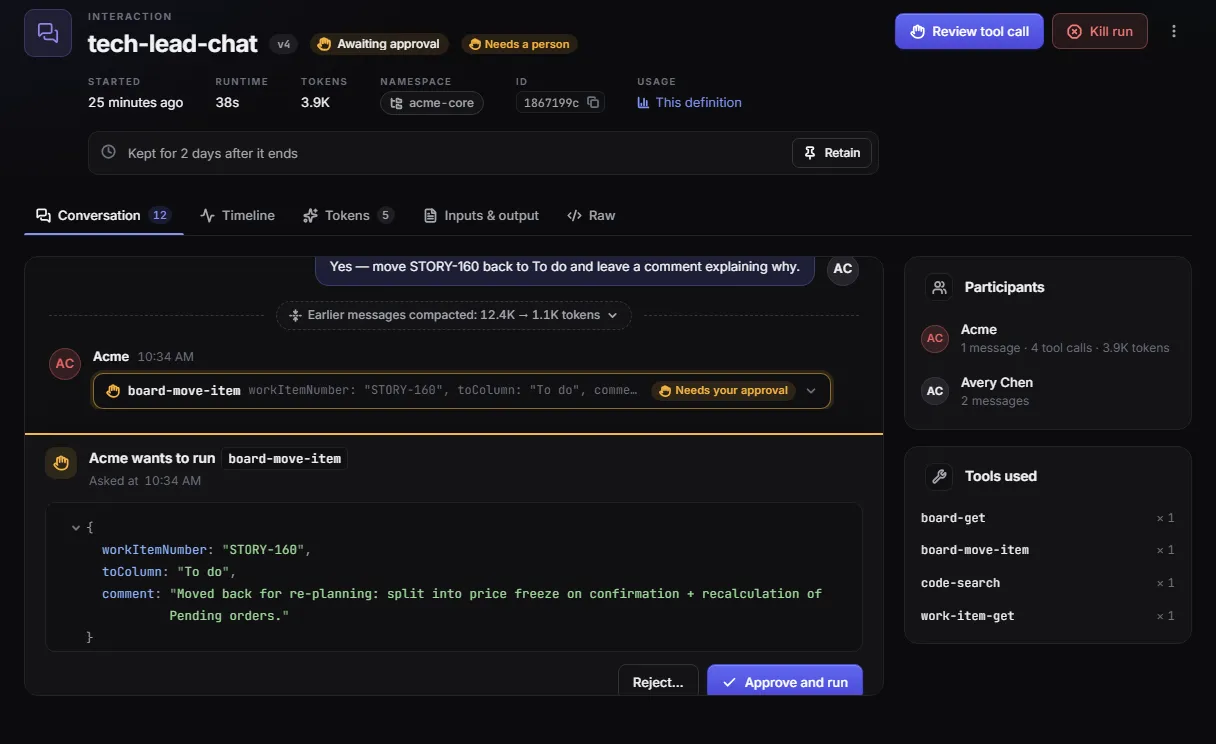
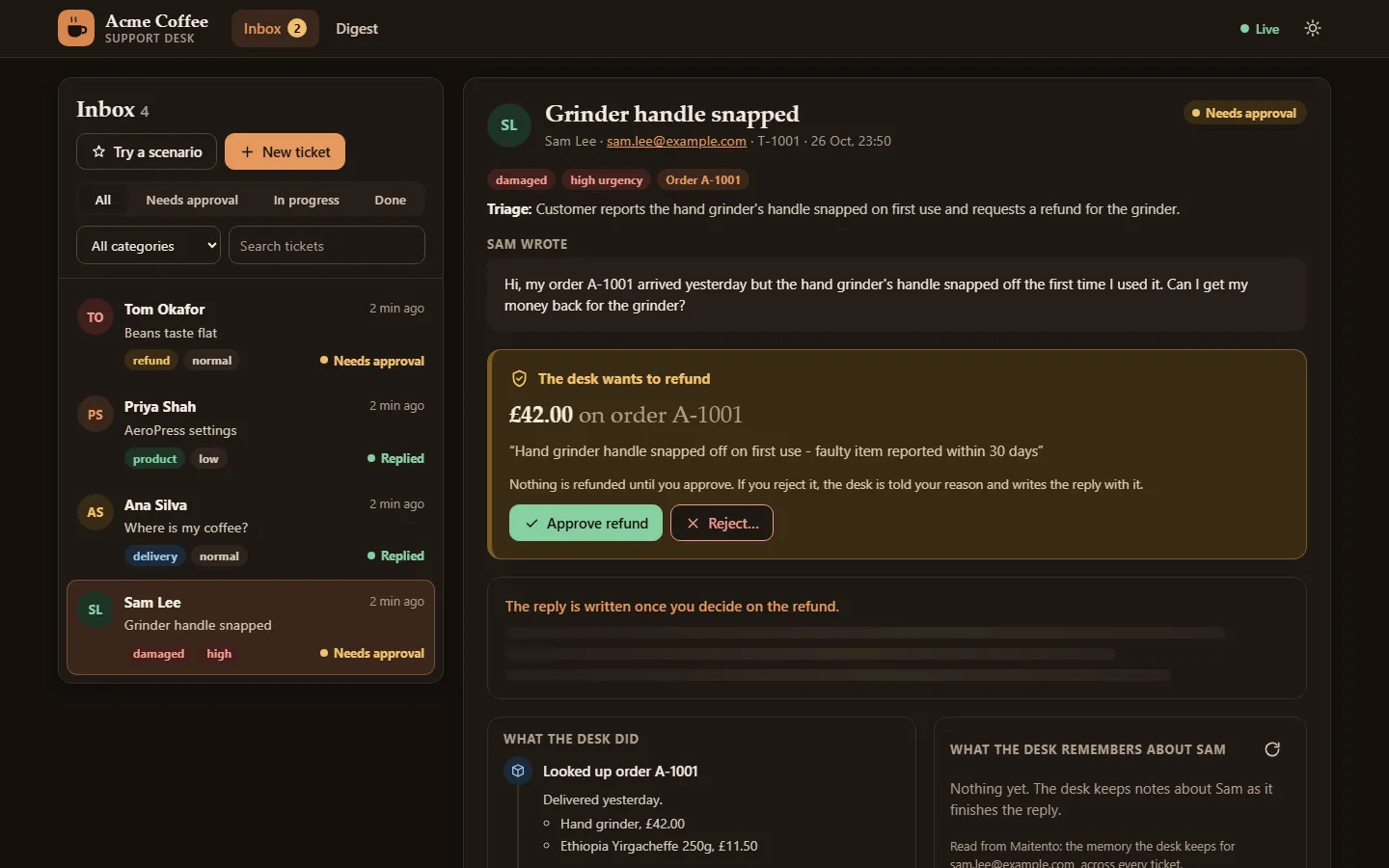
One memory per customer, chosen by their email, so the agent wakes up knowing who it is talking to. The refund tool waits for a person, and time spent waiting is never charged. Tutorials 10 and 20
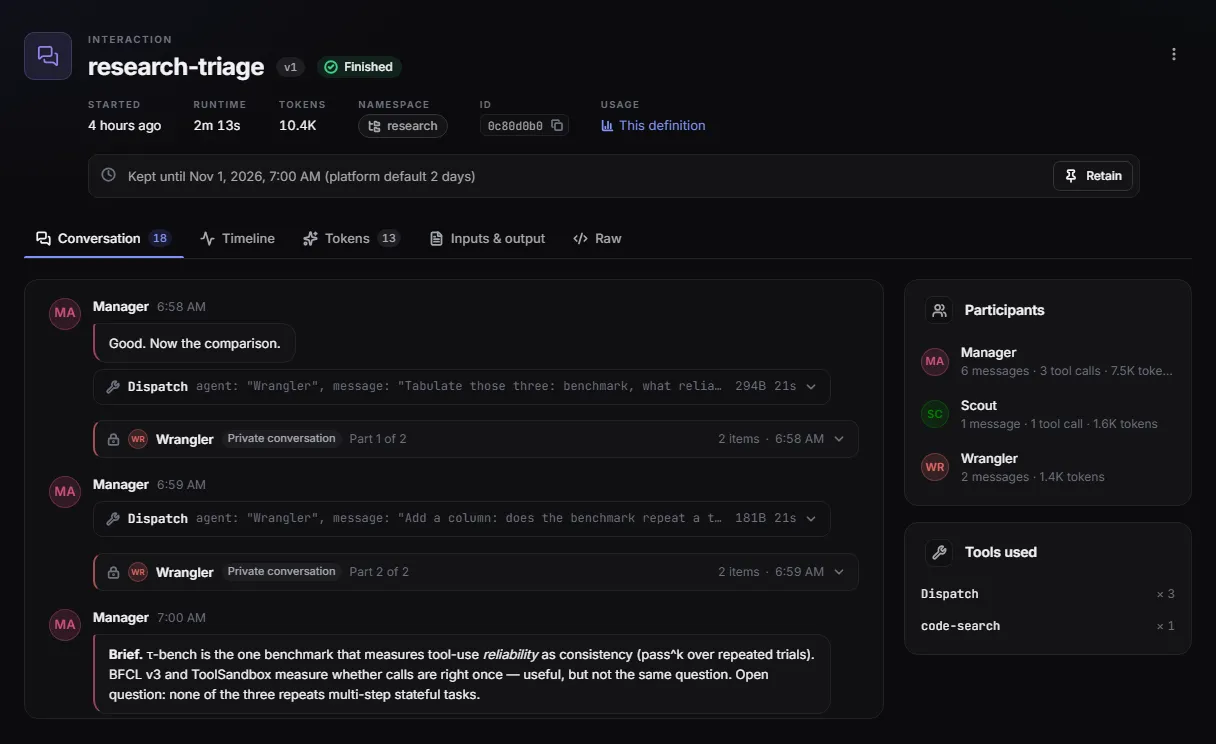
A manager hands work to a writer and a fact-checker. A lead researcher starts a swarm of sub-runs in parallel, waits for them all, and combines what comes back. Tutorials 18 and 19
An app chains the steps: it calls your API, writes files, starts a throwaway Linux machine to crunch them, and returns the report. On a schedule, with nothing to host. Tutorial 23
Your models, your keys
The building blocks
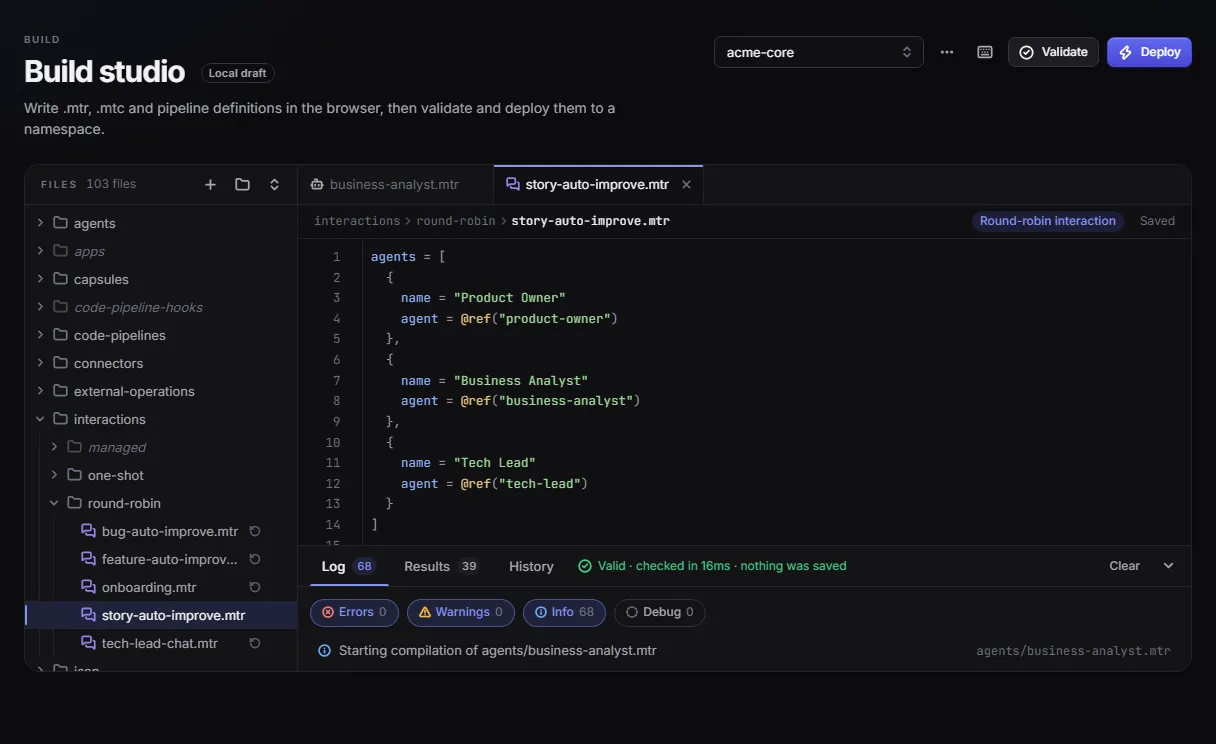
Write each piece as a small project file. Maitento compiles them, runs them, and keeps them running.
An agent is a model and its instructions. Put several together: a router that hands each turn to a specialist, a round-robin chat, or a manager splitting work across a team.
Learn morePoint a connector at an OpenAPI operation and it becomes a tool your agents call, with its secret, its guidance, and a person’s approval when it matters.
Learn moreUpload documents and search them by meaning. Chunking, embedding and vector search are built in.
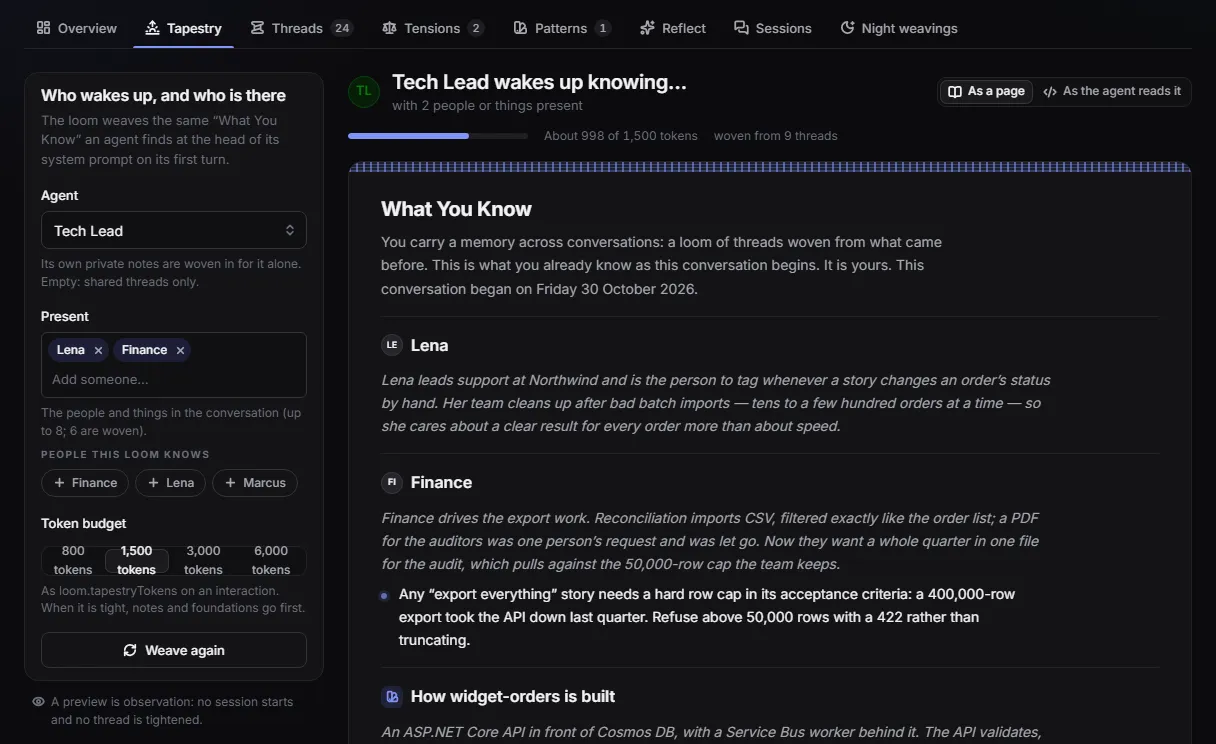
Learn moreA loom gives an agent long-term memory: who it’s talking to, what they care about, what was decided.
Learn moreCapsules are throwaway Linux machines with time limits, for running real code against real files.
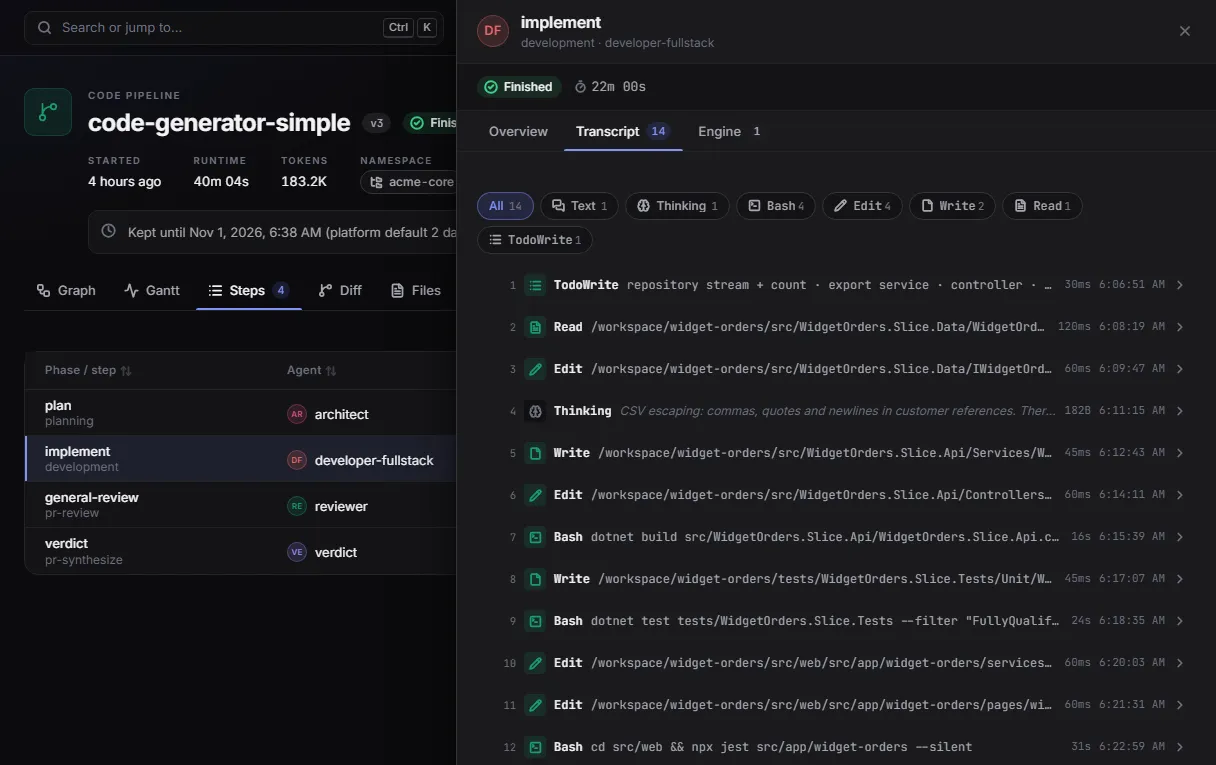
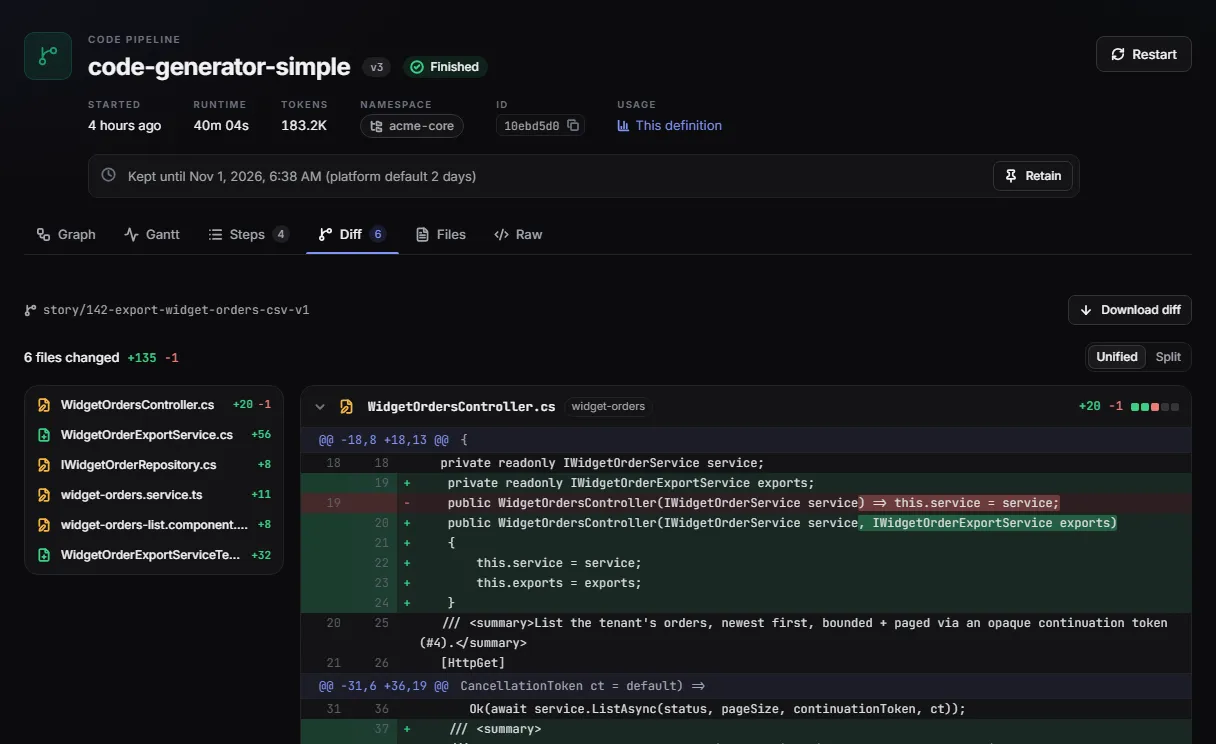
Learn moreCode pipelines run Claude Code, Codex, Gemini CLI and others on your repositories, in a sandbox, and push a branch. Hooks send work back until the tests pass.
Learn moreChain steps into an app, run it on a schedule or from your code, and get a signed webhook when anything finishes.
Learn moreBuilt-in tools search the web and read pages, PDFs, Office documents and images, with no connector to write.
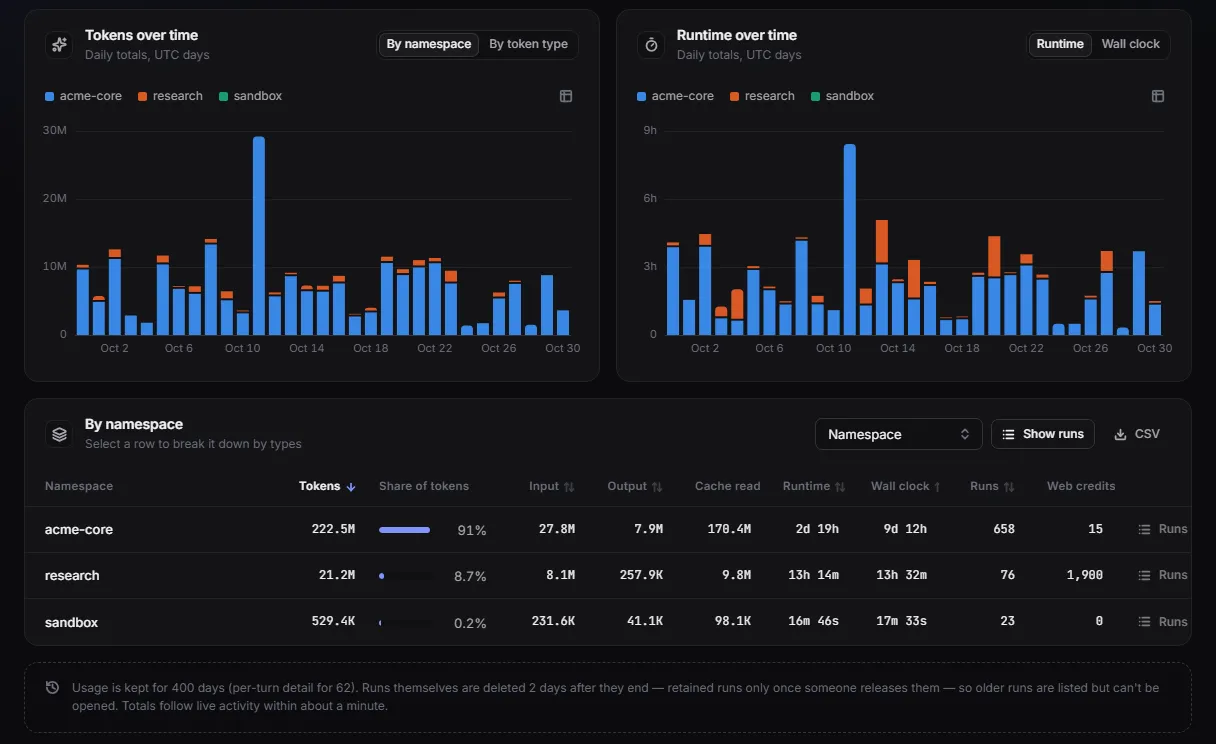
Learn moreEvery run’s conversation, tool calls, timing and tokens, live over events and in the portal, from the first token to the last.
Learn moreZero infrastructure
Long-running agents need far more than a model call. Maitento runs all of it for you, so your repository holds what your application does, not how it stays up.
What you'd otherwise build and run
What you write with Maitento
maitento/
├─ agents/ desk-agent.mtr
├─ interactions/ answer-ticket.mtr
├─ apps/ nightly-digest/
├─ capsules/ ticket-report.mtr
├─ code-pipelines/ add-feature/
└─ connectors/ shop-orders.mtr$ mt deploy ./maitento Deployed in 327msWhat you can build
Each one is built step by step in the tutorials, and each is a handful of small files.
Triages every ticket, looks up the order through your API, answers from your policies, remembers each customer, and stops for a person before any refund. A nightly app runs a sandbox to write the day’s report.
connector = @ref("shop-order-refund")
auth = {
header = "X-Api-Key"
secret = @ref("shop-api-key")
}
guidance = "Refunds an order. Refund only what the policies allow, and never more than was paid for the item."
// A person approves every refund before Maitento calls it.
requiresApproval = trueagent = {
name = "Desk"
agent = @ref("desk-agent")
}
task = @prompt("draft-reply-task")
functions.openApi = [
{
name = "find-order"
ref = @ref("find-order")
},
{
name = "search-policies"
ref = @ref("search-policies")
}
]
// The knowledge base comes in with each run and goes
// straight into the search: the model can't choose another.
inputs.functions.binding = [
{
function = @ref("search-policies")
name = "policiesId"
target = "partitionId"
type = "request"
}
]
// One memory per customer, chosen by their email address.
loom = {
  enabled = true
  scope = "Input"
  scopeInput = "email"
  subjectInputs = [ "customer" ]
  recall = "Suggest"
  weave = "Manual"
}string main(string namespaceName) {
string day = DateTimeToString(DateGetUtc(), "yyyy-MM-dd");
// Call your app through a tool: Maitento adds the secret.
jsonObject path = JsonObjectCreate();
path = JsonObjectSetString(path, "date", day);
string response = ExtOpInvoke("list-tickets", "", "", path, "");
// Save them where the capsule can read them.
VfsWriteText("support-desk", namespaceName, "/tickets/" + day + ".json", response);
// A throwaway Linux machine turns them into a report.
guid capsuleId = CapsuleStart("ticket-report", namespaceName, "[]", "[]", "[]");
jsonObject capsule = CapsuleAwait(capsuleId);
string report = VfsReadText("support-desk", namespaceName, "/reports/latest.md");
AppStateSetOutputString("report", report);
return("Digest written for " + day);
}One agent splits a big question into small ones, starts a sub-run for each in parallel, waits for them all, and combines the answers. Each child has its own time limit, and never outlives its parent.
agent = {
  name = "LeadResearcher"
  agent = @ref("lead-researcher")
}
task = "Compare these countries: %%countries%%. Start one country-facts interaction per country so they run in parallel, wait for them all, then write a short comparison."
// The interactions this one may start as sub-runs, and how many at once.
swarm = {
  interactions = [
    @ref("country-facts")
  ]
  maxConcurrent = 5
  maxTotal = 10
}model = @ref("deepseek.deepseek-v4-flash")
prompt = "You split big research jobs into small ones, run them in parallel, then combine the answers. If a piece of research fails, say which one failed and why. Never fill the gap from your own memory."
summary = "Splits research into parallel sub-tasks"
// Lets this agent start other interactions as sub-runs.
allowSwarm = true// The child: researches one country.
agent = {
name = "CountryResearcher"
agent = @ref("country-researcher")
}
task = "Give three short facts about %%country%%: population, capital and one thing it is famous for."
inputs.prompts = [
{
name = "country"
required = true
}
]
// A child never runs past the time its parent has left.
duration.max = "00:02:00"The editor plans the issue and dispatches work; the writer keeps its own conversation with the editor, and every fact check starts fresh. Team members only see what the manager sends them.
// The manager gets the task and hands out work.
manager = {
  name = "Editor"
  agent = @ref("editor")
}
agents = [
  {
    name = "Writer"
    agent = @ref("writer")
    // Keeps its own conversation with the editor.
    mode = "Private"
  },
  {
    name = "FactChecker"
    agent = @ref("fact-checker")
    // A fresh fact checker every time it is asked.
    mode = "OneTime"
  }
]
limits.maxDispatches = 8model = @ref("deepseek.deepseek-v4-flash")
prompt = "You are a newsletter editor. You plan the issue, hand work to your team with the Dispatch tool, and decide when it is good enough. Your final reply must be the finished newsletter and nothing else: no notes about the edits."
summary = "Plans and edits the newsletter"A developer agent changes your repository in a sandbox; a tester runs the tests in a fresh session; a hook reads the report and sends the work back until the tests pass, then a branch is pushed.
{
  "name": "tested-change",
  "durationAutoTermination": "00:45:00",
  "maxFixIterations": 2,
  "agents": [
    { "name": "developer", "role": "Fullstack" },
    { "name": "tester", "role": "Reviewer" }
  ],
  "phases": [
    {
      "name": "implement",
      "steps": [{
        "name": "implement",
        "agentName": "developer",
        "prompt": "@prompt(implement)",
        "isCommitable": true
      }]
    },
    {
      "name": "test",
      "dependsOn": ["implement"],
      "postHook": "TestGate",
      "steps": [{
        "name": "run-tests",
        "agentName": "tester",
        "prompt": "@prompt(run-tests)",
        "isNewSession": true,
        "outputVariableName": "testReport"
      }]
    }
  ]
}// The test phase's post hook decides what happens next.
string TestGate(string processId, string methodName) {
string report = PipelineGetVariable(processId, "testReport");
// The tests pass: nothing more to do.
if (StringContains(report, "EXIT CODE: 0", false)) {
return("{\"decision\": \"done\"}");
}
// They fail: loop back. The developer fixes the code with the
// report in its prompt, then the tests run again, with this hook.
PipelineLog(processId, "TestGate: the tests failed, looping back to the developer");
// (fixPhase and retestPhase are the two phases, as JSON: see the tutorial.)
return("{\"decision\": \"loop\", \"loop\": {\"blockingIssueCount\": 1, \"fixPhases\": [" + fixPhase + ", " + retestPhase + "]}}");
}Wren shares one memory across everyone in a family: what one person mentions in passing, the next person’s conversation knows. Overnight, the loom weaves what it learned.
// Every conversation weaves into the one loom in looms/family.mtr,
// so what one person tells Wren, the next person's conversation knows too.
agents = [
  {
    name = "Wren"
    agent = @ref("wren")
    loom = @ref("family")
  }
]
task = @prompt("wren-family")
human = {
  first = true
}
loom = {
  enabled = true
  subjectInputs = [ "userName" ]
  recall = "Suggest"
  weave = "Suggest"
}// A loom a whole household shares. Deploying creates it;
// a deploy never touches what it holds.
description = "What Wren knows about the family: shared across everyone who talks to it in wren-family."
nightWeaving = true
quietMinutes = 5The portal
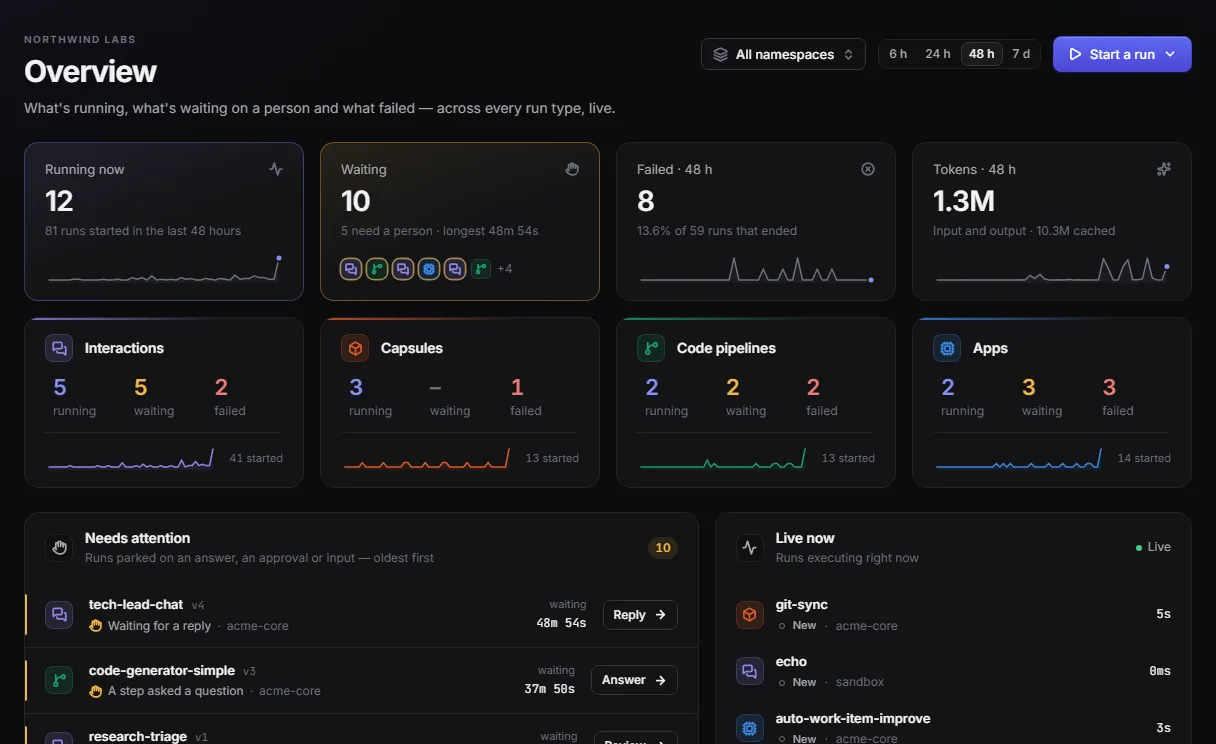
Deploy from your editor and CI, then follow every run as it happens: what each agent said, called and changed.
Built on Maitento
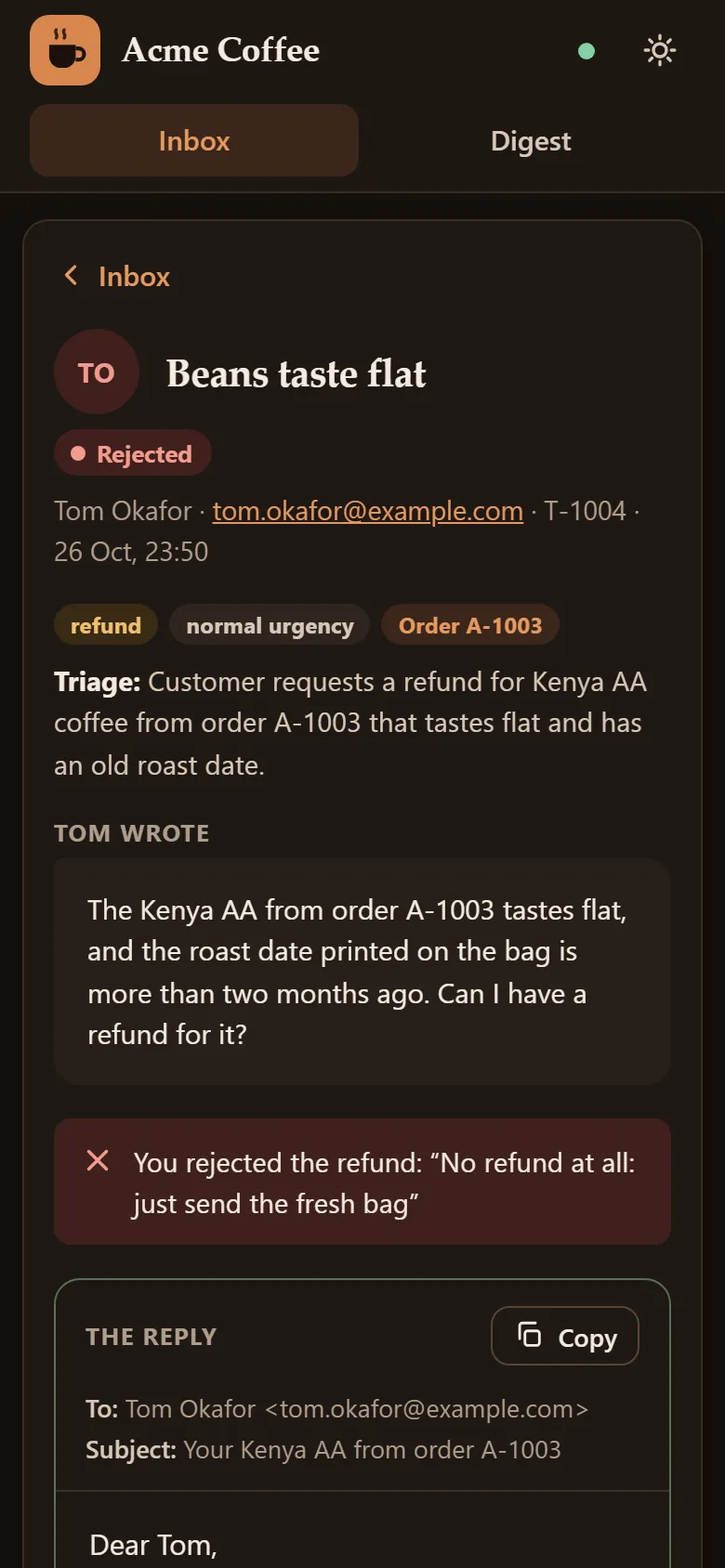
The tutorials end with a real application: a coffee shop’s support desk, with a web app, a phone view and a nightly digest. Every piece of it is a Maitento building block you will have learned.
For every size of team
No per-seat pricing, and nothing charged on model tokens: your provider bills you for those, on your own key.
Free · Dev
Free, then $29/month
Start on Free with no card. Move to Dev when you want sandboxes, coding agents and more hours.
Start freeBuilder · Team
From $129/month
Unlimited users on every plan, more runs at once, a discount on everything past your allowance, and a longer run history.
Compare plansScale · Enterprise
From $949/month
High volume, scheduled first. Enterprise adds custom pricing, quotas and priority under a contract.
Talk to usLaunch pricing in USD, before tax, billed annually. See every plan and rate.
Security
An agent only sees the surface you give it. Keys, account ids and anything you bind stay with Maitento; code runs in throwaway containers, never in your network; a person approves what matters, and every run is on the record.
What the agent sees
find-order(orderId)Looks up an ordersearch-policies(query)Searches the shop’s policiesissue-refund(orderId, amount)Refunds an orderneeds approvalNo URLs, no keys, no account ids, no other parameters.
What Maitento sends
GET https://shop.example/orders/A-1001X-Api-Key: •••••••• from the secret shop-api-keyAdded by MaitentoPOST knowledge-search{ "partitionId": this run’s knowledge base, "query": "faulty item refund" }Bound from the runPOST https://shop.example/orders/A-1001/refundheld until a person approves itApprovalFix any parameter the model has no reason to choose: an account, a unit, a flag. Maitento adds it to every call, and the model can’t see it, change it, or be talked into another.
In the docsCapsules and code pipelines get a fresh container that ends when its commands finish, when you stop it, or when its time runs out. Nothing to host, patch or clean up.
In the docsMark a tool as needing approval and the run stops before calling it, until someone approves, or rejects it with feedback the agent can act on. Waiting is never charged.
In the docsEach run keeps its conversation, every tool call and its arguments, approvals, timing and tokens, and which of your credentials served it, for as long as your plan’s retention allows.
In the docsEvery model call goes to your provider on your own account, under your agreement with them. Give each of your customers their own keys with credential stacks.
In the docsSecrets and credentials are encrypted at rest with AES-256-GCM under a key that belongs to your tenant alone, itself protected by a root key that never sits in the database. One tenant’s key never unlocks another’s.
Get started
From no account to an agent answering you, with the docs beside you all the way.
Give it this prompt. The docs publish an llms.txt and every page as Markdown, made for agents to read.
Set up Maitento in this project. Read https://docs.maitento.com/llms.txt first, then follow https://docs.maitento.com/get-started/. Install the Maitento SDK for this project's language, create a first agent and a one-shot interaction under ./maitento, deploy them and run the interaction. Read my API key and namespace from the MAITENTO_API_KEY and MAITENTO_NAMESPACE environment variables, and never write a key into a file.

Free to start, no card. Your models, your keys, and nothing to run but your idea.